An IP address is a logical address assigned to a network interface so two devices can identify each other's traffic at Layer 3.
An IPv4 address is 32 bits, written as four decimal octets: 192.0.2.10 is really 11000000.00000000.00000010.00001010, eight bits per octet.
32 bits is 2³² possible values, 4,294,967,296 of them, and the internet has been finding ways to make that number stretch further since classes gave way to Classless Inter-Domain Routing (CIDR) in the 1990s, and further still since IPv6 replaced the 32 with 128.
Network and host portions
An IPv4 address splits into two parts: the network portion, shared by every host on the same link, and the host portion, which picks out one interface on it.
Written as 192.0.2.10/24, the /24 says the first 24 bits are the network, the remaining 8 are the host:
| Part | Bits | In 192.0.2.10/24 |
|---|---|---|
| Network | 24 | 192.0.2 |
| Host | 8 | .10 |
A subnet mask says the same thing in address form: 255.255.255.0 for a /24, ones over the network bits and zeros over the host bits.
Two addresses follow directly from that split. The network address has every host bit set to zero (192.0.2.0), and the broadcast address has every host bit set to one (192.0.2.255).
Neither is assignable to a host, which is why a /24's 256 addresses hold 254 usable ones.
The five classes
Before CIDR, an IPv4 address's network and host split was not chosen per network. It was read off the first bits of the address itself, into one of five classes.
| Class | First octet | Default mask | Default CIDR | Usable hosts |
|---|---|---|---|---|
| A | 1–126 | 255.0.0.0 | /8 | 16,777,214 |
| B | 128–191 | 255.255.0.0 | /16 | 65,534 |
| C | 192–223 | 255.255.255.0 | /24 | 254 |
| D | 224–239 | - | - | multicast, not host addresses |
| E | 240–255 | - | - | reserved |
192.0.2.10 falls in 192-223, so it is Class C by this table, with a default /24 and 254 usable hosts on its own network - which happens to be exactly the split already used above, since this address was never anything but a Class C one.
The classes stopped being how address space is actually allocated once CIDR arrived: a /20 or a /27 needs no class, only a prefix length, and a single organization can hold a block that spans what used to be several classful networks at once.
What survives is the vocabulary - a captured packet's source address still falls somewhere in this table whether or not anyone allocated it that way.
CIDR and subnetting
CIDR notation is the /number itself: the count of bits that belong to the network, independent of any class.
Subnetting is dividing one network into several smaller ones by borrowing bits from the host portion into the network portion - a /24 split into four /26 networks borrows two bits, since 2² is four.
ipcalc 192.0.2.0/24 --s 62 62 62 62
Each /26 gets 64 addresses and 62 usable hosts, the same arithmetic as the /24 above at a smaller size: 2^(host bits) − 2, with the network and broadcast address of each smaller subnet reserved exactly as they were for the original one.
The magic number
Every prefix from /24 to /30 has a fixed block size - how many addresses apart one subnet's network address is from the next - and it is the one number worth memorising, since the mask and the host count both fall out of it.
| Prefix | Mask | Block size | Usable hosts |
|---|---|---|---|
/24 | 255.255.255.0 | 256 | 254 |
/25 | 255.255.255.128 | 128 | 126 |
/26 | 255.255.255.192 | 64 | 62 |
/27 | 255.255.255.224 | 32 | 30 |
/28 | 255.255.255.240 | 16 | 14 |
/29 | 255.255.255.248 | 8 | 6 |
/30 | 255.255.255.252 | 4 | 2 |
The block size is 256 minus the mask's last non-255 octet, and every network address at that prefix is a multiple of it: a /26 always starts on a multiple of 64, which is exactly why the four subnets above landed on .0, .64, .128 and .192.
Subnetting to fit a host count
Nobody actually starts from "I want four subnets." A real network starts from "this group needs room for 50 devices," and the mask is whatever the table above says covers that number.
ipcalc 192.0.2.0/24 --s 50
50 hosts does not fit in a /27's 30, so the table above rules that out; a /26's 62 is the smallest block that clears 50, so that is what gets allocated. Fewer than 62 devices ever fill it, and the rest of the original /24 - a /26 and a /25, printed above as unused - is still free for whatever comes next.
VLSM: a different size for each subnet
Real requirements rarely arrive as one number, and giving every group the same mask because one of them needs 100 hosts wastes the same block size on the group that needs 10. Variable Length Subnet Masking (VLSM) is sizing each subnet to what it actually needs instead, largest requirement first, out of one shared block:
ipcalc 192.0.2.0/24 --s 100 50 20 10
Ordering matters. The 100-host request goes first and takes half the /24 outright, a /25; the 50-host request then takes half of what remains, a /26 starting right after it; each smaller request packs into the space the larger ones left, with nothing between subnets and one /28 still spare at the end.
Do this smallest-first instead and the first small block strands an odd-sized gap too small for whatever needs to fit later - the size order is not a style choice, it is what keeps the block from fragmenting.
Reverse subnetting
Every example so far starts from a network address and works out its range. The more common real question runs the other way: given a host address and nothing else, which subnet is it actually on?
ipcalc 192.0.2.130/26
192.0.2.130 is not a network address, but every address belongs to exactly one, and the mask alone is enough to find it: mask off the host bits and what is left is the network the address lives on, 192.0.2.128/26 here, not the block a reader might guess by rounding to the nearest hundred.
The same answer by hand, using nothing but the block-size table above:
Find the block size. A /26 has a block size of 64, so every /26 network address is a multiple of 64: .0, .64, .128, .192.
Take the largest multiple that does not pass the host. 130 sits between 128 and 192, so the network address is 192.0.2.128.
Add the block size, minus one, for the broadcast. 128 + 64 - 1 is 191, so the broadcast address is 192.0.2.191, and the usable hosts run from .129 to .190, which is what ipcalc printed.
This is the version of subnetting a firewall rule or a traceroute actually needs: not designing a range, but placing one address correctly inside a range someone else already drew.
Private ranges
Three IPv4 blocks are reserved by RFC 1918 for private networks and are never routed on the public internet:
| Range | CIDR | Class | Usable hosts |
|---|---|---|---|
10.0.0.0 – 10.255.255.255 | /8 | A | 16,777,214 |
172.16.0.0 – 172.31.255.255 | /12 | B | 1,048,574 |
192.168.0.0 – 192.168.255.255 | /16 | C | 65,534 |
The middle block is worth a second look: 172.16.0.0/12 is not one Class B network but sixteen of them end to end, which is why it is still Class B by first octet even though the prefix is /12, not the classful default /16.
It is also the block Hak5's WiFi Pineapple ships into. The device's own management address is 172.16.42.1, and its setup docs have a connecting host configure a static fallback of 172.16.42.42 with a 255.255.0.0 mask when there's no DHCP to hand one out - both numbers straight from Hak5's own documentation, not a capture, since there's no Pineapple on hand here to photograph one from.
The IPv4 header
Every IPv4 packet carries a header in front of its payload, twenty bytes at minimum, before whatever protocol runs on top of it even starts.
tshark -r arp.pcapng -Y "icmp.type==8" -V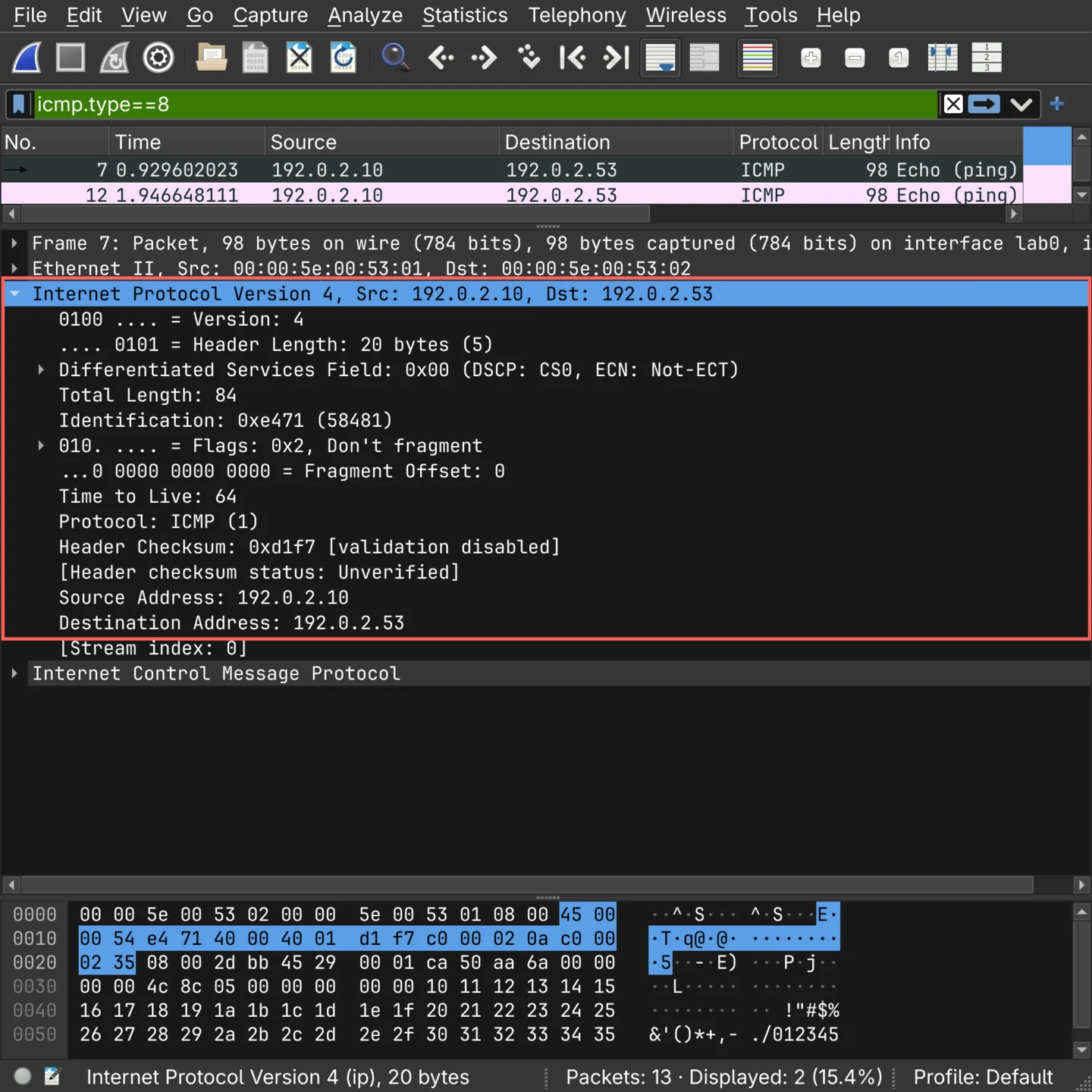
Version and Header Length share the first byte, four bits each: version 4, and a length of five 32-bit words, twenty bytes, the minimum.
The next two fields cover size and identity - Total Length for the whole packet, 84 bytes here with twenty of them header and the rest this echo request's own payload, and Identification for tracking which fragments belong together if the packet is ever split.
That split itself is what Flags and Fragment Offset describe: this packet carries Don't fragment and was never split, so offset stays at zero.
Time to Live (TTL) starts at 64 and loses one at every router it passes; reaching zero discards the packet rather than letting it loop forever. Protocol names what comes next inside the payload - 1 for Internet Control Message Protocol (ICMP) here, 6 for TCP, 17 for the User Datagram Protocol (UDP).
A Header Checksum covers the header alone, never the payload above it, and source and destination close things out, 32 bits each, the two addresses everything above was about.
| Field | Size | In this capture |
|---|---|---|
| Version | 4 bits | 4 |
| Header Length | 4 bits | 20 bytes |
| Differentiated Services | 8 bits | 0x00 |
| Total Length | 16 bits | 84 |
| Identification | 16 bits | 0xe471 |
| Flags | 3 bits | 0x2, Don't fragment |
| Fragment Offset | 13 bits | 0 |
| Time to Live | 8 bits | 64 |
| Protocol | 8 bits | 1, ICMP |
| Header Checksum | 16 bits | 0xd1f7 |
| Source Address | 32 bits | 192.0.2.10 |
| Destination Address | 32 bits | 192.0.2.53 |
IPv6
An IPv6 address is 128 bits, not 32: 2^128 addresses, roughly 3.4 × 10^38, written as eight groups of sixteen bits in hex rather than four decimal octets - 2001:0db8:0000:0000:0000:0000:0000:0053, or with the zero-compression rule RFC 4291 allows once per address, 2001:db8::53.
RFC 4291 also drops something IPv4 never could: there is no broadcast address. Every IPv6 address is instead one of three delivery types.
| Type | Delivered to | IPv4 equivalent |
|---|---|---|
| Unicast | One interface | A normal IPv4 address |
| Multicast | Every interface in a group | The Class D range |
| Anycast | Whichever interface in the group is nearest | Nothing - IPv4 has no equivalent |
Anycast is how Cloudflare's public resolver answers a query near wherever it was asked from despite 2606:4700:4700::1111 being one address advertised from many places at once. Every address in this post so far has been unicast.
Delivery type is one question; scope is a different one, and it only applies within unicast - it is where the address types worth naming actually come from.
| Scope | Prefix | Reachable from outside the link? | Typical use |
|---|---|---|---|
| Link-local | fe80::/10 | No | Automatic on every interface, never routed |
| Unique local (RFC 4193) | fc00::/7, almost always fd00::/8 in practice | No | IPv6's rough equivalent of a private range |
| Global Unicast Address (GUA) | 2000::/3 | Yes | The one worth handing to DNS |
fd00::/8 is the practical half of fc00::/7: RFC 4193 sets that bit to flag a prefix as locally generated rather than centrally assigned. 2000::/3 is what the Internet Assigned Numbers Authority (IANA) actually allocates GUA space from.
2001:db8::/32 is IPv6's own reserved documentation prefix, RFC 3849's equivalent of the IPv4 ranges this post's other captures already use, and it is what every address in this section is drawn from.
One link-local address, many links
Every interface gets a link-local address automatically, and fe80::/10 is only unique per link, not globally - two different interfaces on the same machine can carry the identical address. Handed one with nothing else to go on, a tool has no way to tell which link is meant:
./lab.sh ipv6-zone
Nothing about the address was wrong - the first attempt lost every packet only because nothing said which link to send it on.
%lab0 is the zone identifier (ID) RFC 4007 defines for exactly this, the interface's own name appended after a %, and it is what turns an ambiguous address back into a specific one. On a real machine the same syntax applies with whatever the interface is actually called there - fe80::1%eth0, fe80::1%wlan0 - and it is why a link-local address copied from one machine's ip addr output rarely works pasted into a command on another without it.
Three addresses, one interface
The link-local address is automatic, but a Linux host with IPv6 working usually carries two more addresses besides it, and they are not interchangeable: one is worth pointing a server record at, the other is not.
Both come from the same mechanism. A router sends a Router Advertisement (RA) naming a prefix, and a host runs Stateless Address Autoconfiguration (SLAAC) against it - this lab has no real router either, so the advertisement was crafted and sent once from the resolver, the same box that answers DNS elsewhere in this lab.
./lab.sh ipv6-slaac
The last line is the link-local address, always there, never leaving this link.
The middle one is SLAAC's stable address: 200:5eff:fe00:5301 is this interface's own media access control (MAC) address, 00:00:5e:00:53:01, with fffe spliced into the middle and its seventh bit flipped, which is the Extended Unique Identifier (EUI-64) method - readable straight off the address, and the reason it never changes is that the MAC address it is built from does not either. valid_lft forever is what makes it the one to hand out in DNS.
The first line is the temporary address RFC 4941 adds on top: a random suffix instead of the MAC address, and a preferred_lft well short of its valid_lft so a replacement takes over while this one is still valid but no longer offered to new connections. It exists so this host does not hand every site it connects to the same traceable identifier - which is exactly why it is the wrong address for anyone else to try to reach this host at.
The middle address is also, in principle, reachable directly from anywhere with a route to 2001:db8::/64 - unlike a private IPv4 address behind Network Address Translation (NAT), nothing here needs a forwarded port to be found from outside the link. Reachable is not the same as open, though: whatever answers on that address, or refuses to, is a firewall's decision on this host, made once per address, not a side effect of NAT hiding it by default.
Typing one into a URL
An IPv6 address's own colons collide with the colon a URL already uses to separate a host from a port, so http://2001:db8::53:8080/ is not that address on port 8080 - it is unparseable, and a browser or curl has no way to guess which colon was meant.
RFC 3986 fixes this the same way IPv4 never had to: wrap the address in square brackets, http://[2001:db8::53]:8080/, and everything outside the brackets goes back to meaning what it always meant.
curl "http://2001:db8::53:8080/"
curl "http://[2001:db8::53]:8080/"![Terminal output of two curl attempts. The first, without brackets, fails immediately: curl: (3) URL rejected: Port number was not a decimal number between 0 and 65535. The second, with the address wrapped in square brackets, succeeds: 200 http://[2001:db8::53]:8080/](https://cdn.0xexploitlabs.org/blog/ip-addressing-and-subnetting/ipv6-literal.80a0b122-716.webp)
Nothing about the address changed between the two lines - only whether the client could tell where it ended.
Neighbor discovery instead of ARP
Resolving an address to a hardware address on the local link works differently on IPv6:
./lab.sh ipv6
That absence is the point: IPv6 has no Address Resolution Protocol (ARP).
Address resolution is folded into ICMPv6 itself as Neighbor Discovery Protocol (NDP) - a Neighbor Solicitation asking who has an address, a Neighbor Advertisement answering it - and the same protocol also sends the Router Solicitations visible above, which is how a host on this link finds a router without the Dynamic Host Configuration Protocol (DHCP).
The IPv6 header
The IPv6 header itself carries four times the address in each of its two address fields, in fewer fields overall:
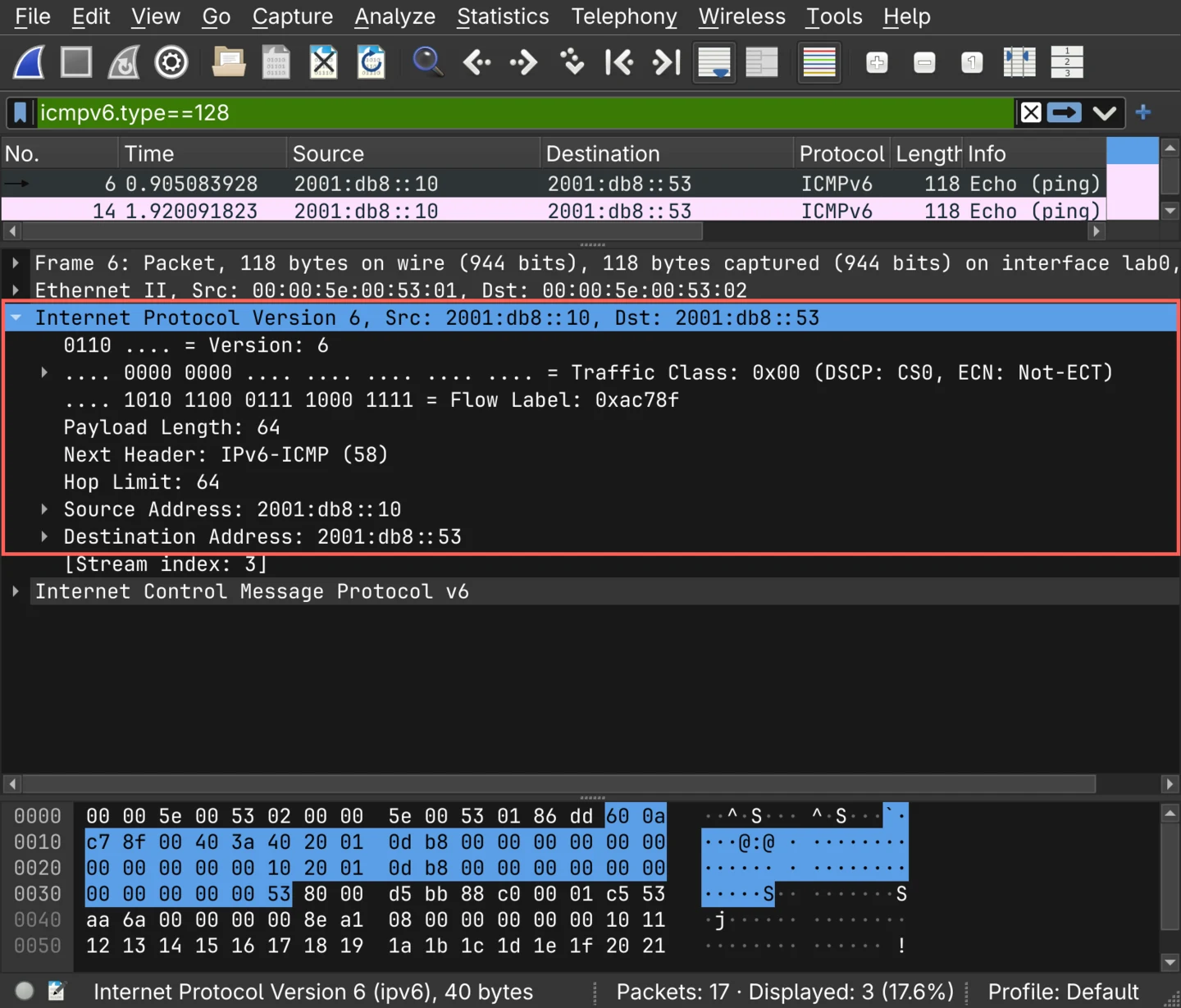
| Field | Size | In this capture |
|---|---|---|
| Version | 4 bits | 6 |
| Traffic Class | 8 bits | 0x00 |
| Flow Label | 20 bits | 0xac78f |
| Payload Length | 16 bits | 64 |
| Next Header | 8 bits | 58, IPv6-ICMP |
| Hop Limit | 8 bits | 64 |
| Source Address | 128 bits | 2001:db8::10 |
| Destination Address | 128 bits | 2001:db8::53 |
Hop Limit does what TTL did, one less per router, same reason.
Next Header does what Protocol did, naming what follows - 58 for ICMPv6 above, the same field also chains to any extension header IPv6 needs, which is how the fixed header stays this short: what does not apply to a given packet is not in it at all.