The Transmission Control Protocol (TCP) and the User Datagram Protocol (UDP) are the two ways a program hands data to the network, and they sit at the transport layer, one step above IP. TCP opens a connection first, numbers every byte and resends what goes missing. UDP sends one datagram and forgets it.
The packets below come from three captures on a lab link where every address is from a documentation range: a web request over TCP, a refused TCP connection, and a DNS query over UDP. To list the TCP and UDP ports open on your own machine, skip to Check yours on Linux and Windows.
TCP vs UDP at a glance
| TCP | UDP | |
|---|---|---|
| Defined in | RFC 9293 (2022, replacing RFC 793) | RFC 768 (1980) |
| Connection before data | Yes, the three-way handshake | No |
| Delivery | Every byte acknowledged, lost data resent, delivered in order | Sent once, no acknowledgement, no ordering |
| Header size | 20 bytes minimum, 40 with common options | 8 bytes, always |
| A closed port answers with | A TCP reset | An ICMP port unreachable message |
| Typical uses | Web pages, remote shells, email | DNS lookups, clock sync, voice and video calls, HTTP/3 |
RFC stands for Request for Comments, the series the internet's protocols are published in.
Ports: how a packet finds the right program
An IP address gets a packet to a machine. A port gets it to one program on that machine.
Both TCP and UDP put two 16-bit port numbers at the very start of their header, a source and a destination, so a port is a number from 0 to 65,535. The Internet Assigned Numbers Authority (IANA) splits that range in three in RFC 6335:
| Range | Name | What lives there |
|---|---|---|
| 0 to 1023 | System ports (well-known ports) | Servers: 53 for DNS, 443 for HTTPS, 22 for SSH |
| 1024 to 49151 | User ports | Registered services: 3306 for MySQL, 8080 for alternate HTTP |
| 49152 to 65535 | Dynamic ports | Never assigned, free for temporary use |
The client side picks a temporary source port of its own for each connection. Linux doesn't use IANA's dynamic range for that, and two commands show both sides of a port on your own machine:
See the range Linux picks client ports from.
sysctl net.ipv4.ip_local_port_rangenet.ipv4.ip_local_port_range = 32768 60999sysctl reads a kernel setting by name.
Every client port in the captures below falls inside this range: 35314 for the web request, 52394 for the DNS query.
See which ports are waiting for connections.
netstat -tulnProto Recv-Q Send-Q Local Address Foreign Address State
tcp 0 0 127.0.0.53:53 0.0.0.0:* LISTEN
udp 0 0 127.0.0.53:53 0.0.0.0:*-t and -u pick TCP and UDP, -l shows only listening ports, and -n prints numbers instead of service names.
Both lines are this laptop's local DNS resolver on port 53, once for each protocol; other lines are cut.
UDP has no LISTEN state, because there is no connection to wait for.
A TCP port and a UDP port with the same number are unrelated. Port 53 over UDP and port 53 over TCP are two different doors, as the two lines above show, and a firewall rule for one doesn't touch the other.
The TCP three-way handshake
Before TCP sends a byte of data, the two sides exchange three segments to agree that a connection exists and which numbers each side will count from.
- The client sends a synchronize (SYN) segment, carrying its starting sequence number.
- The server answers SYN, ACK: its own starting number, and an acknowledgement (ACK) of the client's.
- The client sends ACK, acknowledging the server's number.
Here are those three on the lab link, curl connecting to a web server on port 443:
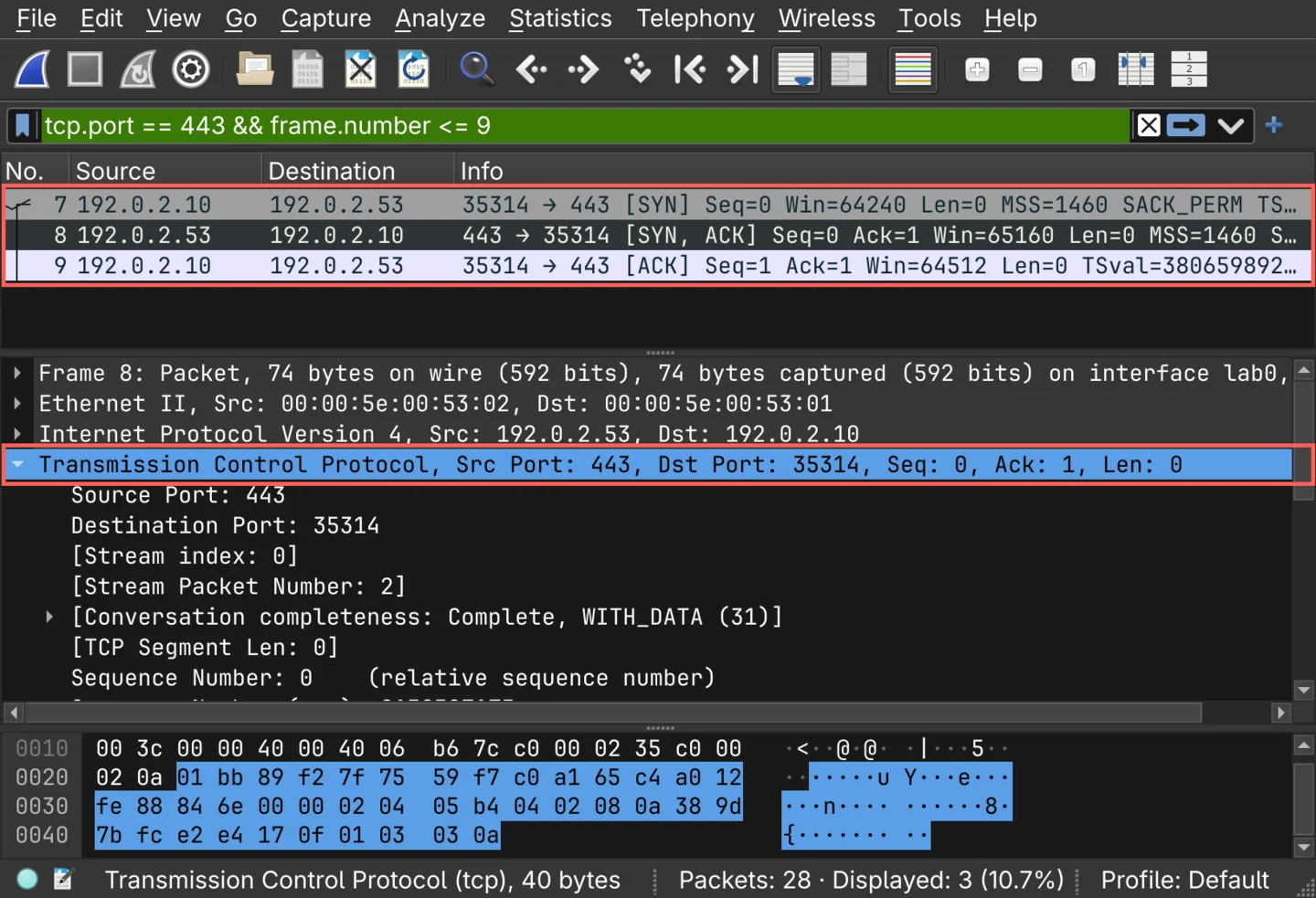
The whole handshake took 54.5 microseconds, from the SYN at 0.876156904 seconds to the ACK at 0.876211421. That's two virtual interfaces on one laptop. Across the internet the same exchange costs a full round trip to the server before any data can be sent.
The handshake carries no data, so Len=0 on all three.
Frames 5 and 6 of the same capture, just before the SYN, are the client using the Address Resolution Protocol (ARP) to find the server's media access control (MAC) address, because the SYN can't be put in an Ethernet frame without it.
The SYN and the SYN-ACK also carry options, each side announcing its own.
MSS=1460 is the maximum segment size, the most data that side will accept in one segment: a 1500-byte Ethernet payload minus a 20-byte IP header and a 20-byte TCP header.
Those options are why frame 8's TCP header is 40 bytes long and not 20.
Sequence and acknowledgement numbers
Wireshark shows Seq=0 and Ack=1, but those are relative numbers it works out for readability.
The real ones on the wire are large and random:
tshark -r tls-handshake.pcapng -Y 'tcp.port == 443 && frame.number <= 11' \
-T fields -e frame.number -e tcp.flags.str -e tcp.seq_raw -e tcp.ack_raw -e tcp.len7 ··········S· 3231802819 0 0
8 ·······A··S· 2138397175 3231802820 0
9 ·······A···· 3231802820 2138397176 0
10 ·······AP··· 3231802820 2138397176 1568
11 ·······A···· 2138397176 3231804388 0tshark is Wireshark's command-line version: -r reads a saved capture, -Y applies a display filter, and -T fields with each -e prints only the fields named.
The columns are the frame, its flags (S for SYN, A for ACK, P for push), the raw sequence number, the raw acknowledgement number and the bytes of data.
The client started counting at 3231802819.
The server acknowledged 3231802820, one more, because a SYN uses up one sequence number even though it carries no data.
The client did the same for the server's 2138397175.
Frame 10 is the first data: 1,568 bytes, the ClientHello that opens a Transport Layer Security (TLS) session. The server's acknowledgement in frame 11 is 3231804388, which is exactly 3231802820 plus 1568. That's all an acknowledgement is: the number of the next byte the receiver expects. If a segment goes missing, the acknowledgement stops moving, and the sender resends from there.
The starting number is random on purpose. RFC 9293 requires a clock-driven starting number and recommends adding a pseudorandom function of the two addresses, the two ports and a secret key. That function must not be computable from outside, it says, or an attacker could still guess at sequence numbers. RFC 5961, which RFC 9293 points to, describes what a good guess buys: resetting somebody else's connection, or injecting data into it, without ever seeing its packets.
Closing a TCP connection: FIN
A connection ends with a finish (FIN) segment in each direction, each one acknowledged.
In the capture the server closed first (F is FIN):
tshark -r tls-handshake.pcapng -Y 'tcp.flags.fin == 1 || frame.number == 24' \
-T fields -e frame.number -e ip.src -e ip.dst -e tcp.flags.str22 192.0.2.53 192.0.2.10 ·······A···F
23 192.0.2.10 192.0.2.53 ·······A···F
24 192.0.2.53 192.0.2.10 ·······A····The textbook picture has four segments, two FINs and two ACKs. This one has three, because the client acknowledged the server's FIN and sent its own in the same segment.
From the first SYN to that last ACK, one HTTPS request took 18 TCP segments.
A closed TCP port: RST
When nothing is listening on a TCP port, the machine still answers. It sends a reset (RST), which kills the attempt before it becomes a connection.
This capture is a DNS client trying DNS over TLS on port 853 against a server that only answers plain DNS, the same refusal covered in the DNS over TLS post:
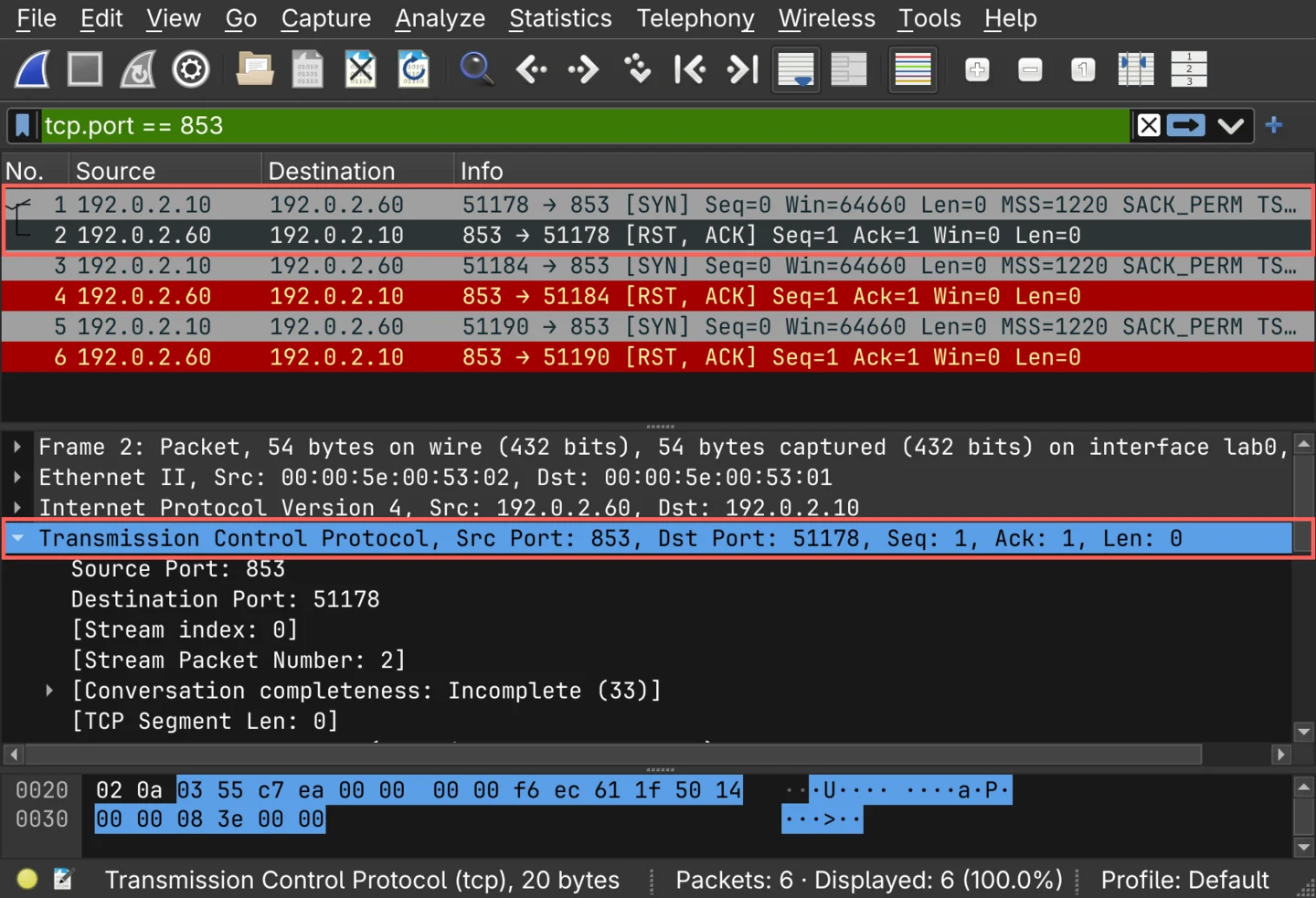
The reset came back 21.6 microseconds after the SYN. The client tried three times, each from a new source port, and got the same answer each time.
A TCP header with no options is 20 bytes, and this reset is exactly that: the status bar reads Transmission Control Protocol (tcp), 20 bytes.
The UDP header: four fields, eight bytes
UDP has no handshake, no sequence numbers and no acknowledgements, so its header has room for very little. RFC 768 defines four fields of 16 bits each:
| Field | Size | In the query below |
|---|---|---|
| Source port | 2 bytes | 52394 (cc aa) |
| Destination port | 2 bytes | 53 (00 35) |
| Length | 2 bytes | 60, the 8-byte header plus 52 bytes of DNS |
| Checksum | 2 bytes | 0x848d |
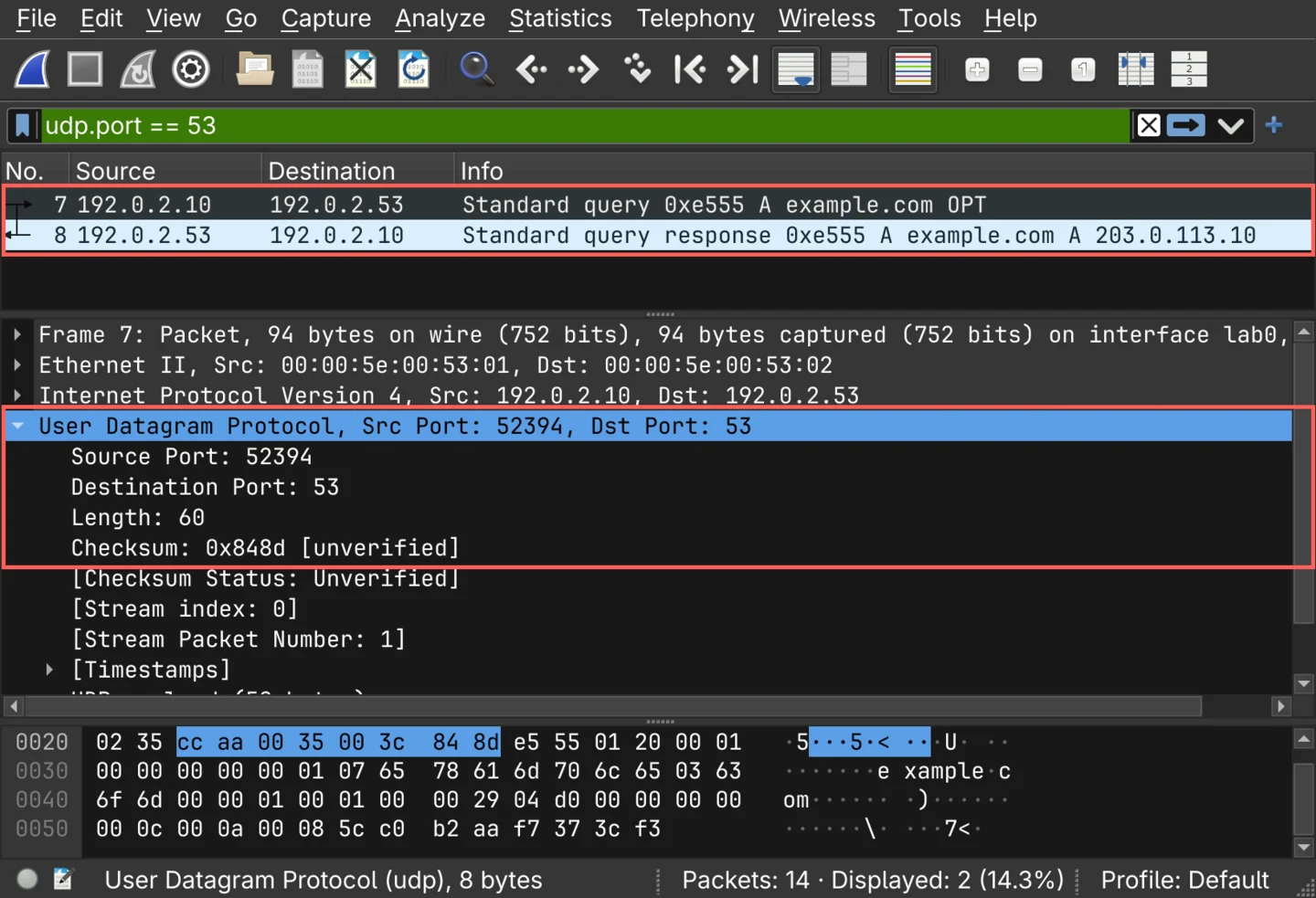
That's the whole lookup. Two packets, where the HTTPS request above needed three segments just to say hello.
UDP leaves everything else to the program. A DNS client that gets no answer simply asks again, and that's cheaper for a short question than holding a connection open. QUIC, the transport under HTTP/3 (a name, not an acronym, as RFC 9000 points out), runs inside UDP datagrams and builds its own acknowledgements and retransmission on top.
A closed UDP port: ICMP port unreachable
UDP has no reset to send. RFC 1122, section 4.1.3.1, says what a host does instead:
If a datagram arrives addressed to a UDP port for which there is no pending LISTEN call, UDP SHOULD send an ICMP Port Unreachable message.
The Internet Control Message Protocol (ICMP) is the error channel of IP. "SHOULD" in an RFC means recommended, not required, and that gap matters to anyone scanning a network.
What a port scanner reads from this
A port scanner is a tool that sends the first packet of a conversation and reads the answer. Nmap's documentation lists exactly how it maps each answer to a port state.
For a TCP SYN scan (nmap -sS):
| Answer to the SYN | Port state |
|---|---|
| SYN, ACK | open |
| RST | closed |
| Nothing, even after retransmissions | filtered |
| An ICMP unreachable error | filtered |
Nmap never sends the final ACK. The SYN-ACK already said the port is open, which is why the documentation also calls it half-open scanning.
For a UDP scan (nmap -sU):
| Answer to the datagram | Port state |
|---|---|
| Any UDP response | open |
| ICMP port unreachable | closed |
| Nothing, even after retransmissions | open|filtered |
| Other ICMP unreachable errors | filtered |
UDP scanning is slow, and the reason is the ICMP message from the last section.
Nmap's documentation describes Linux limiting destination unreachable messages to one per second on its test machine, and notes that at that rate a scan of all 65,536 ports takes more than 18 hours.
Silence also can't tell an open UDP port from a firewall dropping the packet, which is why open|filtered exists at all.
Which protocol each service uses
| Service | Transport | Port |
|---|---|---|
| DNS | UDP, and TCP for large answers | 53 |
| DNS over TLS | TCP | 853 |
| HTTPS (HTTP/1.1 and HTTP/2) | TCP | 443 |
| HTTP/3 | UDP, through QUIC | 443 |
| Secure Shell (SSH) | TCP | 22 |
| Dynamic Host Configuration Protocol (DHCP) | UDP | 67 and 68 |
| Network Time Protocol (NTP) | UDP | 123 |
Check yours on Linux and Windows
The ports your machine is listening on are the first thing a scanner pointed at it would find.
On Linux
Listening ports: netstat -tuln, then the Local Address column (what each column means).
A 127.0.0.1 or 127.0.0.53 address answers only this machine; 0.0.0.0 answers the network.
Which program owns each port: sudo netstat -tulnp.
-p adds a column with the process ID and name, and sudo lets it name processes run by other users.
The client port range: sysctl net.ipv4.ip_local_port_range.
On newer Linux systems ss -tuln takes the same flags and prints the same list.
On Windows
These run in Command Prompt. Nothing here was captured on Windows, so no output is shown.
Listening ports: netstat -an, then the TCP lines whose state is LISTENING. UDP lines have no state.
Which program owns each port: netstat -ano. The last column is the process ID, which Task Manager's Details tab lists by name.
The client port range: netsh int ipv4 show dynamicport tcp.
On macOS
netstat -an | grep LISTEN lists the listening TCP ports, and lsof -iTCP -sTCP:LISTEN adds the program that owns each one.