A hub, a switch and a router all connect devices on a network, and what separates them is how much of each frame they read before deciding where it goes. A hub reads nothing and repeats every signal out of every port. A switch reads the destination media access control (MAC) address and sends the frame out of one port, and a router reads the destination IP address and forwards the packet into a different network.
On a three-host lab network, a listener on the third port captured all 8 frames of a three-packet ping between the other two hosts when they were joined by a hub. Through a switch it captured 1. Sent through a router, the same kind of ping kept both of its IP addresses, reached the far side with a time to live one lower than the sender gave it, and travelled there in a new frame with two new MAC addresses.
Hub, switch and router compared
Each of the three works at a different layer of the Open Systems Interconnection (OSI) model, and the layer decides what the device is able to read.
| Device | OSI layer | Reads | Sends traffic for one host |
|---|---|---|---|
| Hub | 1, physical | Nothing | Out of every other port |
| Switch | 2, data link | Destination MAC address | Out of one port, once that address is learned |
| Router | 3, network | Destination IP address | Into the next network, in a new frame |
A bridge belongs in the switch row, because it learns and forwards the same way. A layer 3 switch covers the bottom two rows at once.
What a hub is
A hub is a layer 1 device that receives a signal on one port and repeats it out of every other port. The Ethernet standard, 802.3 from the Institute of Electrical and Electronics Engineers (IEEE), calls it a repeater, which describes the whole job. A hub has no notion that a frame contains addresses, so it has no way to send a frame anywhere except everywhere.
Every device on a hub therefore receives every frame sent by every other device. It is each device's own network interface that throws away the frames not addressed to it.
All the ports of a hub share one collision domain, the set of devices whose transmissions can collide, so only one device can transmit at a time and the hub runs half duplex. Two devices transmitting at once corrupt each other's signal, and both stop and try again after a random wait, which is how shared Ethernet behaved before switches gave every port a collision domain of its own. Hubs are now obsolete.
What a switch is
A switch is a layer 2 device that forwards each Ethernet frame by its destination MAC address, out of the one port that leads to that address.
It finds the port in its MAC address table, also called the content addressable memory (CAM) table, and it builds that table by reading the source address of every frame it receives:
- A frame arrives on a port, and the switch records the frame's source MAC address against that port.
- If the frame's destination MAC address is in the table, the frame goes out of that one port.
- If the destination is not in the table, or is the broadcast address
ff:ff:ff:ff:ff:ff, the frame is flooded out of every port except the one it came in on.
An entry ages out once its address has sent nothing for a while, 300 seconds by default on Linux, so a device moved to another port is learned again rather than looked for in the wrong place.
Each switch port is its own collision domain, and a full-duplex link has no collisions at all. Every port is still in one broadcast domain, the set of devices a broadcast reaches, which is why a broadcast sent to a switch arrives at every host plugged into it. Ethernet frames and switching follows the table as it fills, one frame at a time.
Bridges and switches
A bridge is the switch's predecessor: a device with two ports that joined two network segments and passed a frame across only when its destination was on the other side.
It learns addresses exactly as a switch does.
A switch is a bridge with a port for every device.
The IEEE standard both are built on, 802.1D, is titled MAC Bridges and uses the word bridge for what is sold as a switch.
The Linux kernel calls its software switch a bridge too, which is why every switch in the lab below is created with ip link add ... type bridge.
Managed and unmanaged switches
An unmanaged switch has no configuration at all. It learns, forwards and floods, and that is the whole of what it does.
A managed switch can be configured and monitored, through a web interface, the Secure Shell (SSH) protocol or the Simple Network Management Protocol (SNMP), and the configuration is where the rest of its features live:
| Feature | What it does |
|---|---|
| Virtual local area network (VLAN) | Splits one switch into separate broadcast domains |
| Spanning Tree | Stops redundant links between switches from looping |
| Port security | Caps how many MAC addresses a port will learn |
| Port mirroring | Copies one port's traffic to another port for monitoring |
What a router is
A router is a layer 3 device that connects separate IP networks and forwards each packet towards its destination IP address.
Each interface of a router is in a different network. The router keeps a routing table, a list of networks with the interface or next router to use for each, and for every packet it looks up the destination address, picks the most specific entry that matches, and sends the packet out of that interface.
Forwarding leaves the source and destination IP addresses alone and changes three other things. The frame is replaced: a frame only exists on one link, so the router discards the one the packet arrived in and builds a new one for the next link, with its own outgoing interface's MAC address as the source and the next device's MAC address as the destination. The time to live (TTL), a field in the IP header, goes down by one, and a packet whose TTL reaches zero is discarded instead of forwarded, which is what stops a packet from circling a routing loop forever. The header checksum is recalculated, because it covers the TTL that just changed.
A router does not forward broadcasts from one interface to another, so each network attached to it is its own broadcast domain.
A home router usually also performs network address translation (NAT) and rewrites the source IP address of everything it sends out. That is a separate job on top of routing, and the router in the lab below does not do it.
What a layer 3 switch is
A layer 3 switch is a switch that can also route. Inside a VLAN it forwards frames by MAC address like any other switch, and between VLANs it routes packets by IP address, using an IP interface it holds in each VLAN as that VLAN's gateway. Traffic from one internal network to another is routed inside the switch, with no trip out to a separate router and back.
The labels "layer 2 device" and "layer 3 device" name the same split: one forwards on MAC addresses, the other on IP addresses, and a layer 3 switch is both.
The lab topology
Every capture below comes from a lab built in unprivileged Linux network namespaces, with every IP address taken from the ranges RFC 5737 reserves for documentation and every MAC address from the block RFC 7042 reserves for the same purpose.
The hub and the switch use one topology, three hosts plugged into a single Linux bridge:
| Host | IP address | MAC address | Role |
|---|---|---|---|
| A | 192.0.2.10 | 00:00:5e:00:53:0a | Pings host B |
| B | 192.0.2.20 | 00:00:5e:00:53:0b | Answers |
| C | 192.0.2.30 | 00:00:5e:00:53:0c | Sends nothing, and captures what reaches it |
Host A pings host B three times, which means one Internet Control Message Protocol (ICMP) echo request and one echo reply per ping, after host A has found host B's MAC address with the Address Resolution Protocol (ARP). The capture runs on host C's own interface. Capturing puts that interface in promiscuous mode, so it keeps frames addressed to other hosts instead of discarding them, and a passive sniffer is nothing more than that.
With real hubs obsolete, the hub in this lab is a Linux bridge configured to behave like one. A bridge with an ageing time of 0 keeps no forwarding entry at all, every destination stays unknown, and every frame is flooded:
ip link add br0 type bridge stp_state 0 mcast_snooping 0 ageing_time 0With Spanning Tree and multicast snooping both off, the bridge sends nothing of its own, and the captures hold only what the hosts sent.
The switch is the same command without ageing_time 0, which leaves the kernel's default of 300 seconds.
The router is a third namespace with one interface in each of two networks and forwarding switched on:
| Device | Interface | IP address | MAC address |
|---|---|---|---|
| Host A | eth0 | 192.0.2.10 | 00:00:5e:00:53:0a |
| Router | eth0 | 192.0.2.1 | 00:00:5e:00:53:01 |
| Router | eth1 | 198.51.100.1 | 00:00:5e:00:53:02 |
| Host D | eth0 | 198.51.100.20 | 00:00:5e:00:53:0d |
sysctl -w net.ipv4.ip_forward=1Host A's default route points at 192.0.2.1 and host D's at 198.51.100.1.
The router's capture runs inside its own namespace, on both of its interfaces at once, so one file holds each packet arriving on one side and leaving on the other.
What host C captured behind a hub
./lab.sh hub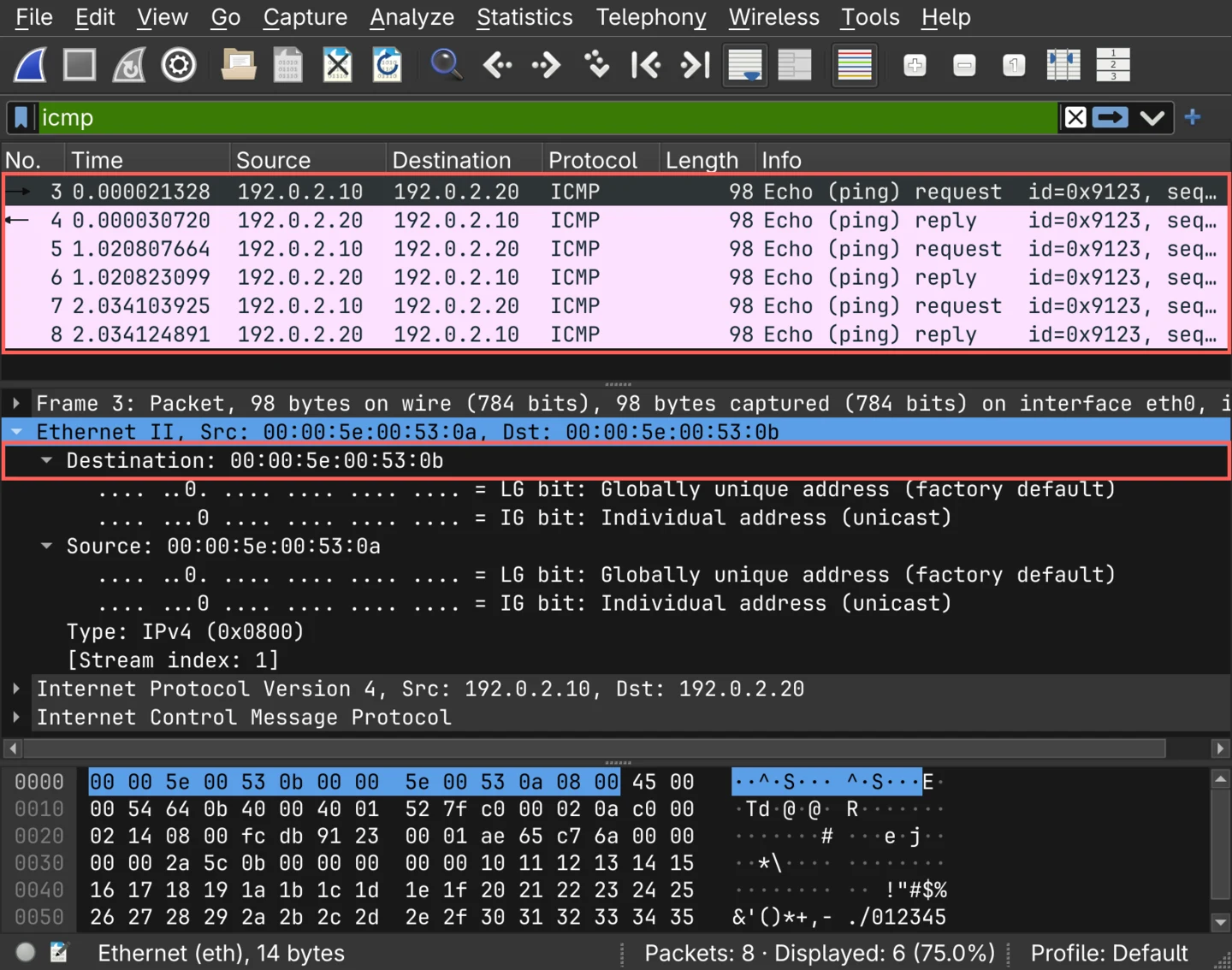
Host C captured 8 frames. It sent none of them, and apart from one broadcast, none of them was addressed to it.
| Frames | From | To | What they are |
|---|---|---|---|
| 1 | Host A | Broadcast | ARP request for 192.0.2.20 |
| 1 | Host B | Host A | ARP reply: 192.0.2.20 is at 00:00:5e:00:53:0b |
| 3 | Host A | Host B | ICMP echo request |
| 3 | Host B | Host A | ICMP echo reply |
The broadcast would have reached host C through a switch as well, but the other 7 are unicast frames between hosts A and B, each addressed to a single host, and host C has them only because the hub sent everything everywhere.
The selected echo request is addressed to 00:00:5e:00:53:0b, which is host B.
When the run ended, the bridge's MAC address table was empty, because with an ageing time of 0 the Linux bridge never keeps an entry: it never had a single port to send a frame to, only all of them.
What the lab reproduces is a hub's forwarding, not its electronics: a bridge receives a whole frame before sending it on and drops a damaged one, where a hub repeats bits as they arrive, collisions included. Who receives a frame comes out the same.
What host C captured behind a switch
./lab.sh switch
With learning on, host C captured 1 frame: the ARP request host A broadcast to find host B.
That broadcast taught the bridge which port host A is on. Host B's ARP reply, addressed to host A, went out of host A's port only, and taught the bridge which port host B is on. From then on every echo request and echo reply had a known destination and left by exactly one port, so the 7 unicast frames that reached host C behind the hub never reached it here.
The forwarding table printed after the run, which is what Linux calls the bridge's MAC address table, ends up holding exactly those two addresses, each against its own port. Host C never sent anything, so the bridge never learned where host C is, and never needed to.
The one frame host C did receive is 192.0.2.10 asking for 192.0.2.20's MAC address, so a listener on a switched network learns who is about to talk to whom, even when it never sees what they say.
What a router changes in a forwarded packet
./lab.sh router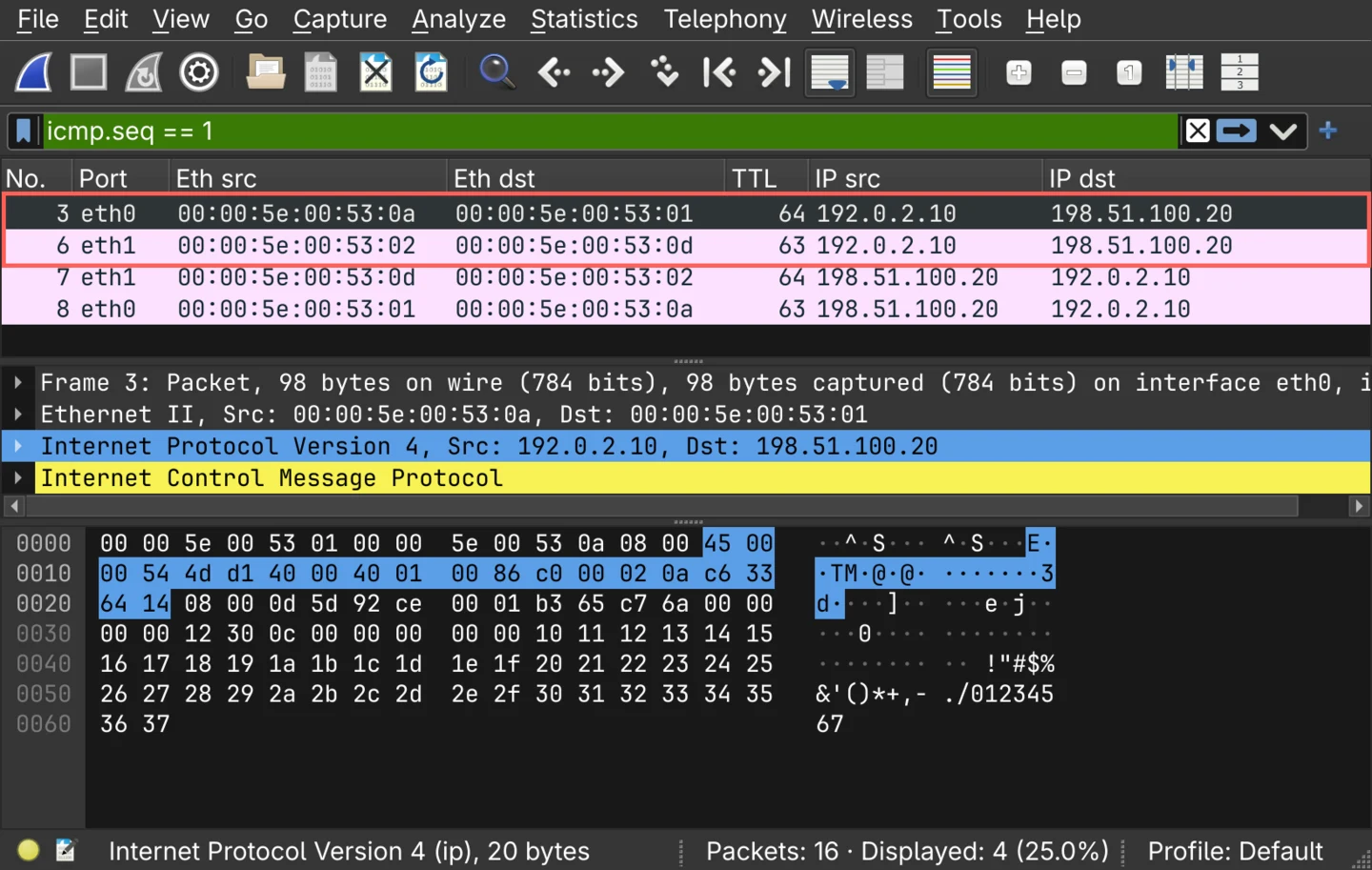
Frames 3 and 6 are one echo request, captured arriving on the router's eth0 and leaving from its eth1.
| Field | Frame 3, arriving | Frame 6, leaving |
|---|---|---|
| Router interface | eth0 | eth1 |
| Source MAC address | 00:00:5e:00:53:0a (host A) | 00:00:5e:00:53:02 (router) |
| Destination MAC address | 00:00:5e:00:53:01 (router) | 00:00:5e:00:53:0d (host D) |
| Source IP address | 192.0.2.10 | 192.0.2.10 |
| Destination IP address | 198.51.100.20 | 198.51.100.20 |
| Time to live | 64 | 63 |
| Header checksum | 0x0086 | 0x0186 |
| Identification | 0x4dd1 | 0x4dd1 |
Both IP addresses and the identification field crossed the router untouched, while the TTL went from 64 to 63 and the header checksum went up by exactly 0x0100.
The checksum moved because of the TTL, which is the high byte of one of the 16-bit words the checksum is calculated over: lowering the TTL by one lowers that word by 0x0100, and the checksum, the complement of the sum, rises by the same amount.
The frame around the packet was replaced.
Host A addressed its frame to the router, and the router built another one from its own eth1 to host D.
To do that it first had to learn host D's MAC address, and the two frames between the request arriving and leaving, 4 and 5, are the router's own ARP request on eth1 and host D's reply.
Frames 7 and 8 are the reply making the same trip backwards, TTL 64 as host D sent it and 63 as the router passed it on to host A.
The router's routing table has one entry per attached network:
192.0.2.0/24 dev eth0 proto kernel scope link src 192.0.2.1
198.51.100.0/24 dev eth1 proto kernel scope link src 198.51.100.1
Across all 16 frames, host A's MAC address appears only on eth0 and host D's only on eth1, and host A's ARP broadcast for 192.0.2.1 stayed on eth0 as well.
What each device exposes to an attacker
Which device sits between two hosts decides what an attacker on the same network has to do to read their traffic.
Hubs and passive sniffing
On a hub, capturing is enough. Host C never transmitted, so nothing on the wire gave it away, and it still holds every frame of the conversation between hosts A and B, including the ARP reply that pairs host B's IP address with its MAC address.
Switches, ARP spoofing and MAC flooding
On a switch the same listener receives broadcasts, frames for destinations the switch has not learned yet, and its own traffic. An attacker who wants host A's traffic has to change where the switch sends it, and that means sending frames.
ARP spoofing changes it from the hosts' side. A forged ARP reply makes host A address its frames to the attacker's MAC address, and the switch then delivers them to the attacker's port, doing exactly what it is meant to.
MAC flooding changes it from the switch's side.
Frames from thousands of invented source addresses fill the MAC address table, addresses the switch has no room left to learn stay unknown, and frames to unknown addresses are flooded, which puts a switch back where the hub capture was.
macof, part of the dsniff suite, is a tool written for exactly that.
Both attacks are active, and a managed switch has a feature aimed at each. Dynamic ARP Inspection checks ARP replies against a table of known-good bindings before forwarding them, and port security limits how many MAC addresses one port will learn. A defender who needs to see switched traffic gets it the legitimate way, with port mirroring, which Cisco calls the Switched Port Analyzer (SPAN).
Routers as a boundary
A router is where the local link ends. ARP, broadcasts and MAC addresses stay on their own side of it: host A's MAC address is in none of the 8 frames on the router's far side. ARP spoofing therefore only reaches hosts in the attacker's own broadcast domain.
A host beyond the first router never receives a frame carrying the sender's MAC address. An IPv6 address built from the MAC address with EUI-64 is an exception, because it carries the MAC address inside the IP header, which the router passes on unchanged.
Host D received the echo request with a TTL of 63, one below the 64 host A sent, and a receiver that knows the sender's starting value can count the routers in between from that difference.
traceroute builds a whole path out of that field: it sends probes with a TTL of 1, then 2, then 3, and each router that lowers a probe's TTL to zero discards it and sends an ICMP time exceeded message back, from its own address.
What the three captures showed
| Device | Result for host A's ping |
|---|---|
| Hub | All 8 frames reached host C, 7 of them unicast frames between hosts A and B |
| Switch | 1 frame reached host C: the ARP broadcast |
| Router | The same IP addresses, a TTL of 63 instead of 64, a recalculated checksum, and a new frame with two new MAC addresses |
Behind the hub, host C had to do nothing at all to hold the whole conversation. Behind the switch it held one broadcast, and would have had to send forged frames to get anything more. Beyond the router none of host A's frames exist: only the packet inside them crosses, one TTL lower.